Your Claude Code and Codex sessions, on one phone screen.
Kiteline runs on your own Mac or Linux machine. It finds the coding agent sessions already running there and lists them in a web app on your phone. Read what each one is doing, reply, and allow or deny tool calls. Gemini CLI, Pi and OpenCode 1.x sessions show up read-only.
The install command ships with v0.1.
Email me when it shipsOpens your mail app. Or write to hello@kiteline.dev.
Tested so far with real Claude Code on an Intel Mac (macOS 12) and an Android phone. Replying works in
tmux, iTerm2 and Terminal.app; other terminals are read-only. Codex runs through kl codex and has
only been tested with a fake model. iPhone is not tested yet.

Staged demo built from real Kiteline screens. Not a live session. Sample data, staged timing. Phone approvals are tested with real Claude Code on an Intel Mac, with the phone’s answer sent by a test script. The phone app is tested on Android. It has to be open: there are no push notifications yet.
One list. Three states.
Monitor your coding agents from your phone: the Claude Code, Codex, Gemini CLI, Pi and OpenCode 1.x sessions running on the machine, in one list. Tap one to read the conversation or watch its terminal screen.
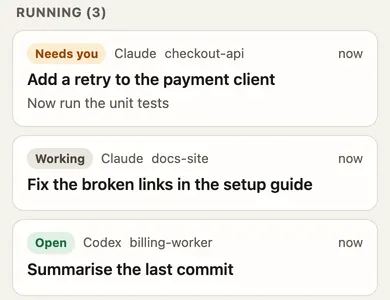
- Needs you
- The agent is waiting on you, for example to allow or deny a tool call.
- Working
- The agent is busy. The conversation updates live.
- Open
- The session is running and idle. You can send it the next message.
Start Claude Code the way you always do. Kiteline finds it.
There is no wrapper for Claude Code. Kiteline reads the session files and the process list on your machine.
Phone approvals need one command, once: kl hooks install.
Codex is different. Start it with kl codex to reply and approve from the phone. Codex started the usual
way still shows up, and you can type into it from the phone if it runs in a supported terminal.
# demo data: Kiteline’s fake test agent, and Codex with a fake model
$ claude
$ kl sessions
open    codex   0m  billing-worker     Summarise the last commit
working claude   0m  docs-site          Fix the broken links in the setup guide
open    claude   0m  checkout-api       Add a retry to the payment client
Approve permission prompts from your phone. First answer wins.
When Claude Code shows a permission prompt to run a tool, a card appears on your phone. Answer there or at your desk. Whichever answer comes first counts.
Nothing is ever auto-approved. If Kiteline isn’t running, or nobody answers on the phone, Claude’s prompt at your desk still works.
Needs kl hooks install, once. Cards appear only when Claude asks; in auto mode Claude decides on its own.
Codex cards need kl codex and have only been tested with a fake model. No push notifications yet:
cards show only while the app is open.
Tap Allow or Deny. This is a demo card, so nothing runs.
npm test -- payment-clientAllowed ✓Denied
In a real session the command would now run at your desk. In a real session the command would not run, and Claude would see your reason.

Reply from your phone. It never types over you.
If there is already text in the agent’s input box at your desk, Kiteline tells the phone and types nothing. A message is never sent twice.
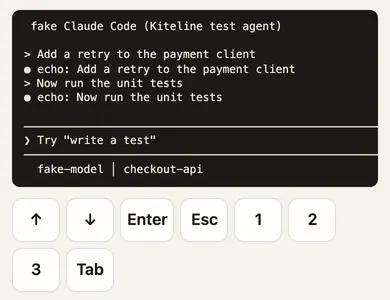
Other terminals are read-only. If a Claude Code or Codex session there is idle, one button moves it into tmux, and then you can reply.
| Terminal | Send | Keys | Live screen |
|---|---|---|---|
| tmux (macOS, Linux) | Yes | Yes | Yes |
| iTerm2 | Yes | Yes | Yes |
| Terminal.app | Yes | Esc only | Yes |
| Others | Read-only, plus Move to tmux | ||
Background-service mode (kl install) is not ready yet. Run kl serve in a terminal.
What works today
| Agent | See | Reply | Approve | Tested with |
|---|---|---|---|---|
| Claude Code | Yes | Yes, in a supported terminal | Yes, after kl hooks install | Real Claude Code on an Intel Mac. On Linux, a fake test agent only. |
| Codex | Yes | Yes, via kl codex or a supported terminal | Via kl codex | A fake model only. |
| OpenCode | Yes, 1.x only | Not yet | Not yet | Parser tests on saved CLI output only. OpenCode 2 is not supported yet. |
| Gemini CLI, Pi | Yes | Not yet | Not yet | Saved transcript fixtures only. |
Your computer: macOS or Linux. Windows is not supported. Phone: tested on Android. iPhone is not tested yet.
Setup is two commands and a QR code.
$ kl setupSets a phone password and tells you what to do next.
$ kl serve --tunnelOpens a Cloudflare quick tunnel and prints a one-time QR code. It needs
cloudflaredinstalled.Scan the code with your phone camera to sign the phone in. The tunnel address changes each time you run
kl serve --tunnel, so scan the new code each time.
That gets you the list, the conversation and replies. For approval cards from Claude Code, also run kl hooks install once. There is no public download of kl yet. It ships with v0.1.
What the connection can see
Kiteline runs on your own machine. Your phone needs a way in, and each way puts someone different in the path. Kiteline is not end-to-end encrypted today.
| Route | Who is in the path | Address | Status |
|---|---|---|---|
Cloudflare quick tunnelkl serve --tunnel | Cloudflare. TLS ends at Cloudflare, so Cloudflare can read the traffic in transit. | Random, new on every run | Works today |
Your local networkkl serve --lan | Your network. The certificate is self-signed, so the phone shows a warning. | Local only | Works today |
| Tailscale | Not tested yet. Kiteline has no Tailscale option today. | ||
- No Kiteline account, and no Kiteline server. Kiteline makes no calls home.
- Pair with a one-time QR code: it works once and expires in 10 minutes.
- Or sign in with a password, then approve the phone at the computer. Passwords are hashed with Argon2id.
- Only signed-in phones can read sessions, send messages or answer approvals.
- The app sets a strict content security policy and refuses requests from other sites.
- Sign-in attempts are rate-limited.
- Kiteline reads your agents’ transcripts. It types into a session only when you send to it.
The pairing QR code signs a phone in. Treat it like a password.
Found a problem? security@kiteline.dev
Coming soon
Planned and not built yet. No dates.
Questions
How do I approve Claude Code permission prompts from my phone?
Run kl setup and kl hooks install once, then kl serve --tunnel (it needs cloudflared), and scan the QR code with your phone. When Claude Code asks to run a tool, a card with Allow and Deny appears in the phone app. Answer there or at your desk. The first answer counts. Push notifications are not built yet; today cards show only while the app is open. Tested with real Claude Code on an Intel Mac (macOS 12) and an Android phone. There is no public download of kl yet. It ships with v0.1.
Does Kiteline work with the Codex CLI?
Yes, with limits. Start Codex with kl codex to reply and approve from the phone. Codex started the usual way still shows up in the list, and you can type into it from the phone if it runs in tmux, iTerm2 or Terminal.app. So far this has been tested with the real Codex CLI talking to a fake model, not with a real Codex model.
How is Kiteline different from Claude Code Remote Control?
Remote Control is Claude Code’s own feature. It is included in Claude’s paid plans and is a good choice if Claude Code is the only agent you run. In that case you may not need Kiteline. Kiteline is for when you also run Codex or other agents and want every session on the machine in one list.
Why not SSH into tmux from my phone?
That works, and Kiteline doesn’t replace it. Kiteline adds one list of sessions across agents, approval cards with Allow and Deny, and a live screen with the keys an agent prompt needs, so you aren’t typing into a raw terminal on a phone.
Is Kiteline open source and self-hosted?
The source goes public with v0.1. Kiteline runs on your own Mac or Linux machine. There is no Kiteline account, no Kiteline server and no hosted version today. The phone app is a web page that the kl binary serves from your machine, so you install nothing on the phone. Your phone still needs a route in: with the Cloudflare quick tunnel, TLS ends at Cloudflare, so Cloudflare can read the traffic in transit. Kiteline is not end-to-end encrypted today.